Teams Phone Configurator: Phone Number Management for Microsoft Teams
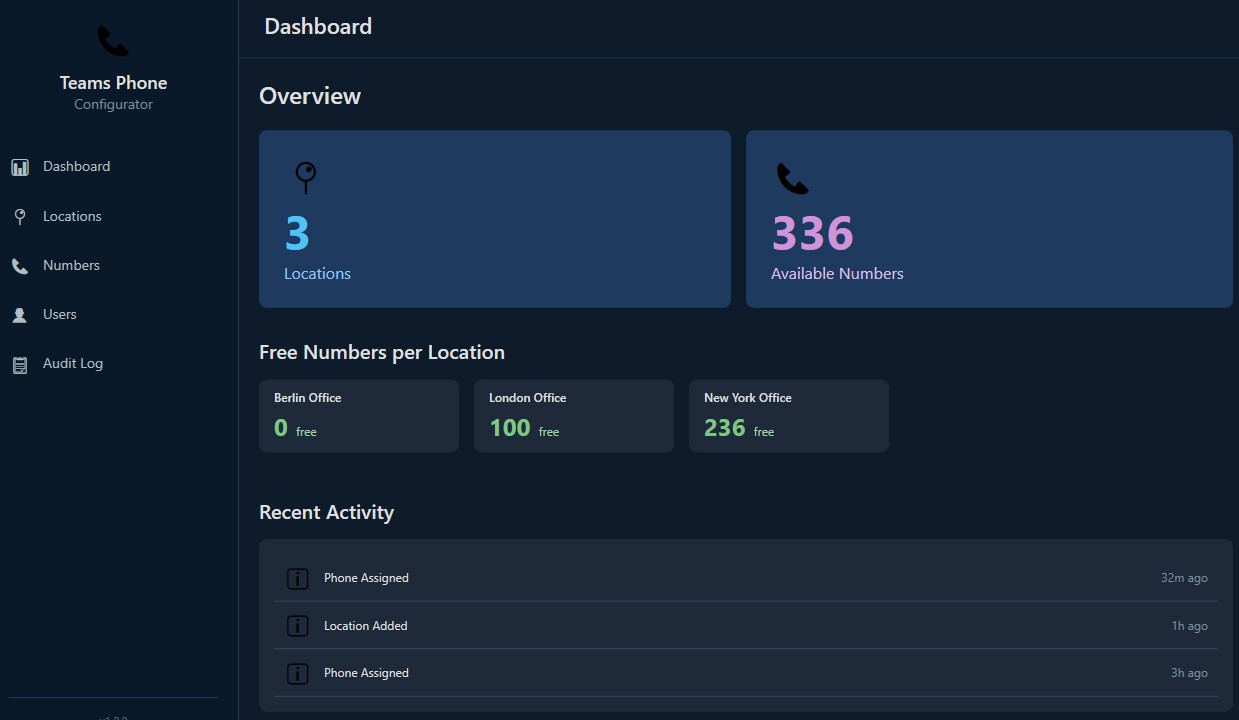
Teams Phone Configurator is a self-hosted web application for managing phone numbers in Microsoft Teams Phone. It replaces the spreadsheet that records which number belongs to whom, and the PowerShell runbook that assigns it. Number inventory, one-screen provisioning, and per-site policy assignment run from a single dashboard, secured by your existing Microsoft Entra ID sign-in.
The Problem It Solves
Every company running telephony on Microsoft Teams owns blocks of phone numbers, a range per office, bought from a local operator. In almost every one of them, the record of which number belongs to whom lives in a spreadsheet maintained by hand. Assigning a number to a new employee means finding that document, picking a number that looks free, opening a PowerShell console, and running a site-specific sequence of commands from an internal runbook. Offboarding means remembering to do the same in reverse. Every manual assignment costs 10–15 minutes of engineer time and sits one typo away from a misrouted number.
What It Does
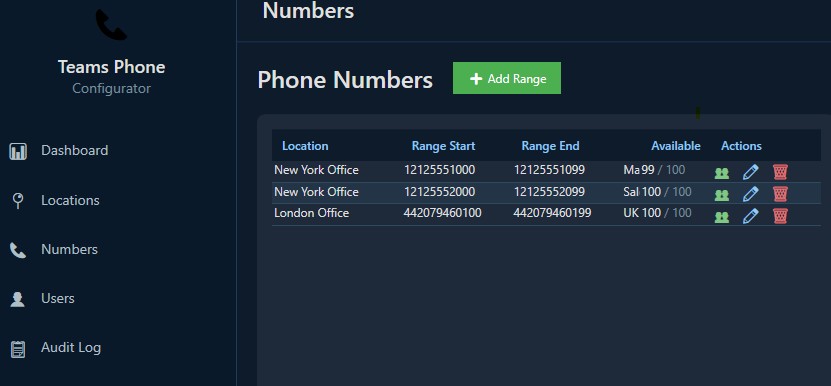
- Number inventory: all ranges organised by office location, with live status for every number (free or assigned) and utilisation per range and per location.
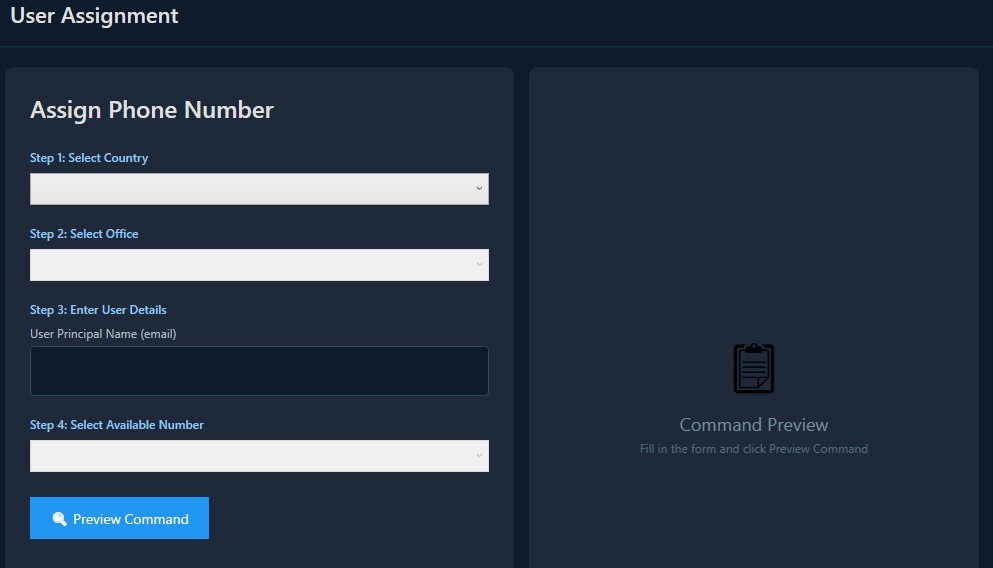
- One-screen provisioning: search the employee in your directory, see whether they hold a Teams Phone licence before anything is changed, pick a number or take the next free one, and assign. The change lands in Microsoft Teams in seconds.
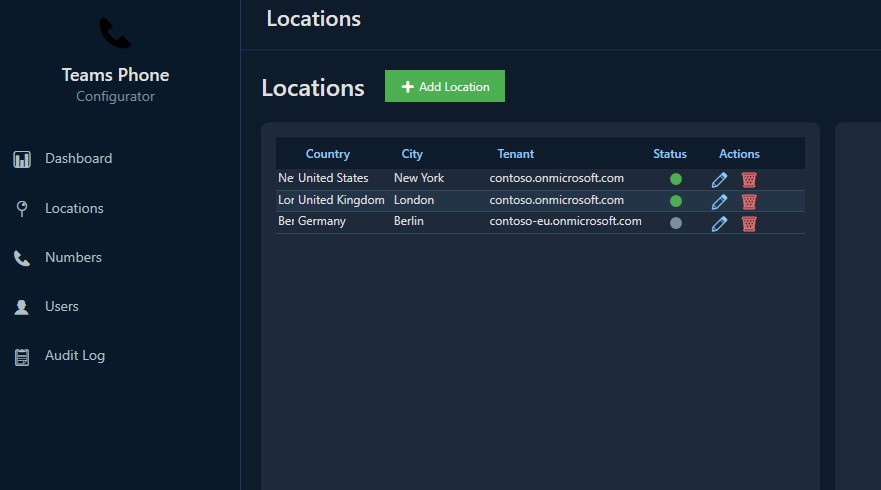
- Site policies applied automatically: each location carries its own voice routing, calling policies and dial plans, applied in order on every assignment, the same way for every admin.
- Offboarding in one action: remove what the departing employee holds from Teams and from the inventory at once; the number returns to the free pool immediately.
- CSV import and export: export a location's assignments for reporting, or import the numbers you already assigned over the years.
- Audit trail: who assigned what to whom, when, and whether it succeeded, recorded with configurable retention.
- REST API: everything the UI does is available to automation, for HR-driven onboarding, ITSM integration and reporting.
What It Deliberately Does Not Do
The application manages the lifecycle of numbers and users, not your telephony infrastructure. Operators, session border controllers and the policy definitions themselves stay in the Microsoft Teams admin center, under the control of your telephony engineers, the app only applies what they defined. That separation of duties is what makes the tool safe to hand to a service desk, which can then provision numbers without holding PowerShell or Teams admin portal access.
Who It Is For
IT teams running Microsoft Teams Phone across multiple offices: Direct Routing, Operator Connect or Calling Plans, typically a few hundred to tens of thousands of numbers: where number administration today depends on documents, tribal knowledge, and PowerShell access for everyone who provisions.
Architecture and Security
The application is built on .NET 10 and Blazor Server with SQL Server persistence (the free Express edition is sufficient). All telephony writes go through the Microsoft Graph number-management API using app-only authentication, no PowerShell, no module dependencies, no interactive sessions. Users sign in with Microsoft Entra ID (OpenID Connect) and access is gated by app roles, Telephony Admin and Viewer; there are no local accounts and no stored passwords. Every permission the service principal holds is admin-consented and listed, with its purpose, on the security page.
Deployment and Cost
The app ships as a single Docker container alongside SQL Server Express, so it runs on any Docker host, including a VM you already have, at effectively zero infrastructure cost. The same container on Azure Container Apps runs in the low single-digit euros per month at this workload. Configuration is entirely environment variables, so one image serves every environment. There is no per-user licensing and nothing to install on client machines. Setup requires one Entra app registration and takes about 15 minutes.
Deployment Options and Pricing
| Option | Where it runs | Infrastructure cost | Setup | What's included | Licence |
|---|---|---|---|---|---|
| Self-hosted | Any Docker host, including a VM you already have | Effectively zero: one container plus SQL Server Express | One Entra app registration, about 15 minutes | Container image, additive schema migration, CSV import, REST API | On request |
| Your own cloud | Azure Container Apps in your own subscription | Low single-digit euros per month at this workload | Same image, same environment variables, TLS at your ingress | Everything in self-hosted, on infrastructure you control | On request |
| Managed by IDE Solutions | Deployed and operated by us, against your tenant | Included in the managed service | We do it: Entra app registration, Graph permissions, spreadsheet migration | Deployment, operation, updates and support, alongside managed Microsoft 365 and Azure | On request |
Licensing is quoted on scope: tenant size, how many locations you run, and whether you operate it yourself or we do. A demo runs against your own environment and takes 30 minutes, with the quote following in the same week. Book a demo or request a quote.
Frequently Asked Questions
Do service desk staff need PowerShell or Teams admin access to assign numbers?
No, and that is the point. Provisioning runs through the app, gated by an Entra ID app role, so a service desk agent can assign and remove numbers without ever holding PowerShell rights or Teams admin center access. Your telephony engineers keep the powerful permissions; everyone else gets a single screen that does one job safely.
Does it work with Direct Routing, Operator Connect and Calling Plans?
Yes. Assignments go through the Microsoft Graph number-management API rather than a specific carrier integration, so it manages numbers regardless of how they reach your tenant, Direct Routing, Operator Connect or Microsoft Calling Plans, across every office in the same dashboard.
Will it change my voice routing, session border controllers or policy definitions?
No. The app manages the lifecycle of numbers and users, not your telephony infrastructure. Operators, SBCs and the policy definitions themselves stay in the Teams admin center under your engineers' control. The app only applies the policies they already defined, in the same order, on every assignment.
How are per-site settings like dial plans and calling policies handled?
Each office location carries its own voice routing, calling policies and dial plans. When a number is assigned, the app applies that location's policy set automatically and identically for every admin, so a new hire in the Munich office always gets the Munich configuration without anyone remembering a runbook.
Can I migrate the numbers I have already assigned over the years?
Yes. Import your existing assignments per location from CSV, so the inventory reflects reality from day one instead of starting empty. You can also export any location's assignments to CSV for reporting or handover at any time.
What does it cost to run and how long does setup take?
It ships as a single Docker container alongside SQL Server Express, so it runs on a VM you already have at effectively zero infrastructure cost, or in the low single-digit euros per month on Azure Container Apps. There is no per-user licensing and nothing to install on client machines. Setup is one Entra app registration and takes about 15 minutes.
Teams Phone Configurator can run on your own infrastructure, or IDE Solutions can deploy and operate it for you. The options are compared on the pricing page. Contact us to book a demo. For tenant-wide accountability over mailboxes, Teams and service accounts, see our Ownership Registry.