Ownership Registry: User Access Reviews, Attestation and Ownership for Microsoft 365
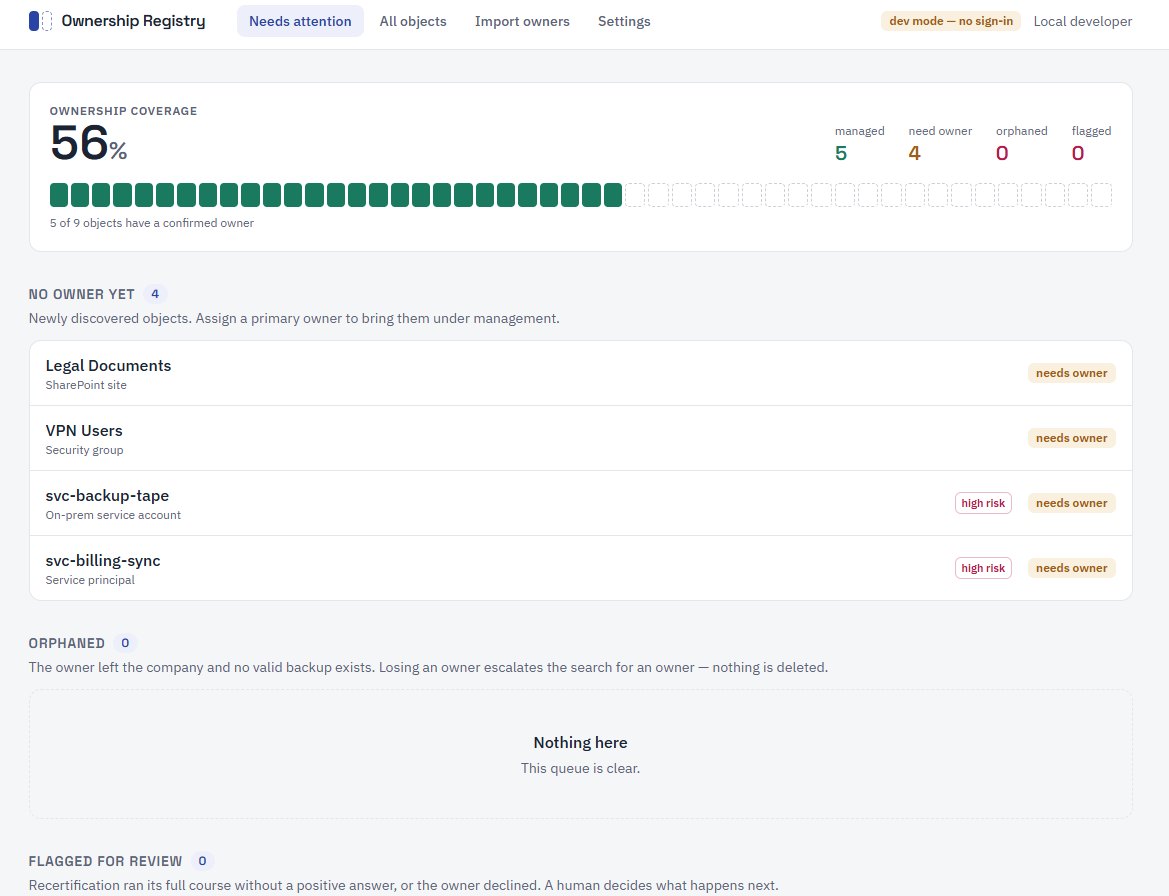
Ownership Registry is access review software with a deliberately narrow job: every shared mailbox, group, Team, SharePoint site and service account in your Microsoft 365 tenant gets a named owner, and that owner regularly attests it is still needed. It keeps a permanent record of accountability, independent of what Microsoft does or does not store, and holds no write permissions on that tenant.
The Problem It Solves
Microsoft 365 tenants grow faster than anyone can govern them. Shared mailboxes outlive the projects they were created for, Teams and SharePoint sites pile up, and service accounts keep running long after the person who requested them has left. Exchange has no owner field for shared mailboxes, and group owners go stale the day someone resigns. When the audit comes, nobody can say with confidence which of the 800 objects in the tenant are still needed, who is accountable for them, or why a five-year-old service account still has access to production. The usual answer is a spreadsheet that was accurate for about two weeks.
What It Does
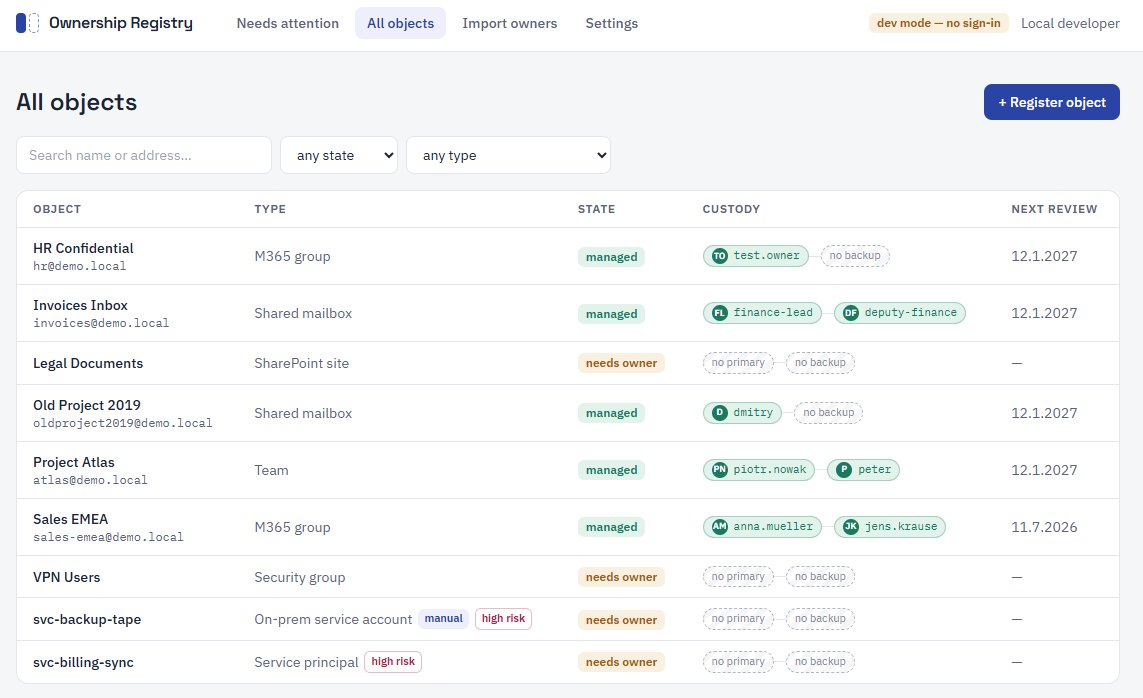
- Complete inventory: a scheduled scan, daily to monthly as you choose, reads the tenant through Microsoft Graph and picks up shared mailboxes, M365 groups, Teams, distribution lists, security groups, SharePoint sites, service principals and service accounts, whichever types you enable. New objects appear in the registry on the next scan.
- A named owner for everything: each object gets a primary and a backup owner. An object without an owner is not a footnote: it is the top item on the dashboard until someone is accountable.
- Recertification that runs itself: on a rotation you choose per object (monthly, every six months, or yearly), owners receive one email with one question, is this still needed? One click answers it, with no login and no training.
- Escalation with an end point: if nobody answers after two reminders, the registry escalates by email to your service desk. A human decides what happens next.
- Evidence, not promises: every scan result, email, reminder, answer and escalation lands in an append-only audit log, so any object's full governance history can be reconstructed, the trail ISO 27001 and SOC 2 assessors ask for.
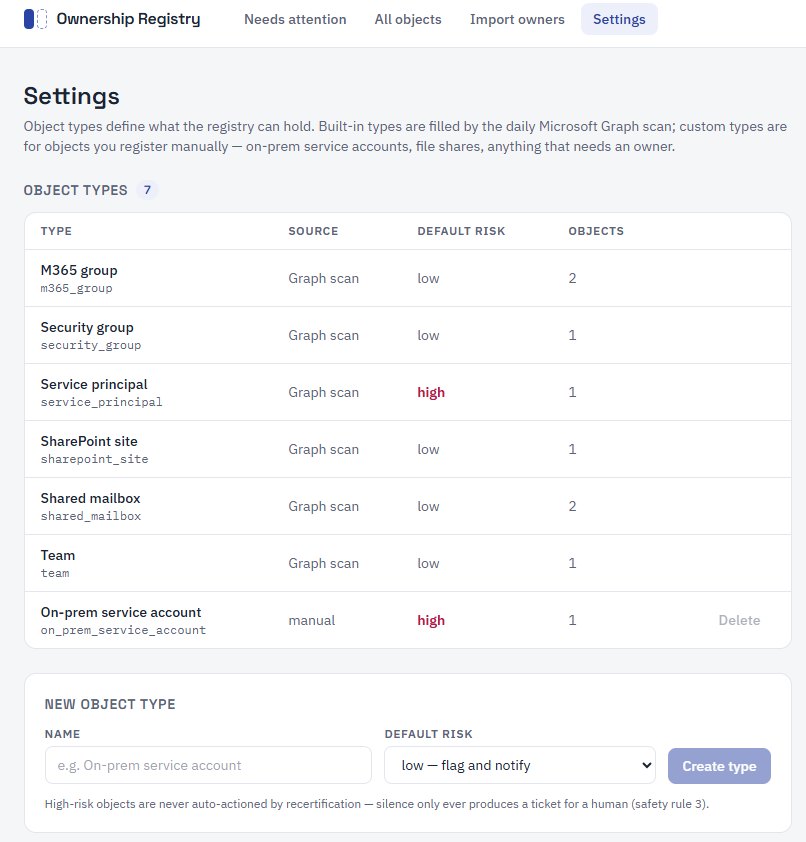
- Custom object types: register on-prem service accounts, file shares and your own object types by hand, for everything the Graph scan cannot see.
Why Orphaned Accounts and Ownerless Groups Are a Business Problem
Orphaned accounts and forgotten groups are a classic attack path: nobody watches them, so nobody notices misuse, industry breach reports consistently list stale, unmanaged accounts among the most common entry points. Ownerless Microsoft 365 groups, unused mailboxes and abandoned sites also cost subscription money every month, and you cannot clean up what has no owner. Departures make it worse: every employee who leaves potentially orphans dozens of objects, and without a system the gap between "person left" and "someone noticed" is measured in years. The registry runs orphaned account detection against Entra ID on every scan, notices a departure on the next run, promotes the backup owner automatically, and flags anything without a valid owner for reassignment.
Automated User Access Reviews for ISO 27001, SOC 2, NIS2 and SOX
ISO 27001 (control A.5.18), SOC 2, NIS2, SOX and cyber-insurance questionnaires all ask some version of the same question: do you periodically review access, and can you prove it? Most companies answer with a heroic once-a-year Excel exercise. Ownership Registry turns that into a continuous user access review: owners attest per object on a cadence of one, six or twelve months, every attestation records who answered and when, and the auditor's favorite question, who owns this and when was it last reviewed?, is answered in seconds, with history. What each framework asks for is set out for ISO 27001 A.5.18 and NIS2.
A Lightweight Alternative to Full IGA Suites
The established answer to access recertification is a full Identity Governance & Administration (IGA) suite: excellent products, and massively oversized for this one job: six-figure annual licensing, months of consulting and connector projects before the first review campaign runs. Compliance platforms treat access reviews as one module among many. Ownership Registry does one job, ownership and access attestation, including the service account governance and shared mailbox ownership that suites often cover only through extra connectors: with no per-user licensing, no consultants, and time to first value measured in days, on a single container. Effort per review cycle is one email and one click per owner.
What It Will Not Do
Ownership Registry holds no write permissions on your tenant. It cannot disable, delete or modify anything: by design, provably, at the permission level. It also never treats silence as consent to remove something: when a review expires, the escalation says whether the object still shows recent sign-in activity, so an in-use mailbox whose owner is on vacation is not mistaken for an abandoned one. Governance tools that delete on autopilot take down production integrations; this one hands the decision to a human.
How It Works
Connect a read-only link to your tenant in under an hour. The first scan fills the registry and the dashboard shows your ownership coverage from day one. Import known owners from an existing export and add the rest as they surface, watching the coverage figure climb as owners are confirmed. Owners then confirm or decline by email on the schedule you set, and declined or unanswered objects are escalated to your service desk by email, so your team decommissions deliberately and with evidence.
Who It Is For
IT managers, security officers and compliance leads running Microsoft 365 tenants that have grown past the point where a spreadsheet can track them: where shared mailboxes outlive their projects, group owners go stale the day someone resigns, and no one can say which objects are still needed or who is accountable for them.
Architecture and Security
The stack is deliberately small and auditable: Node.js 22, TypeScript, Fastify and PostgreSQL 17, with a React single-page app for administration. The audit log is append-only and enforced by a database trigger, so no code path can rewrite history. The tenant connection uses Microsoft Graph with app-only client credentials and read-only application permissions, plus Mail.Send for notifications; pagination and throttling are handled, and a failed collector never corrupts inventory state. Admin access is protected by Microsoft Entra ID sign-in (PKCE) with a dedicated app role, while the owner response page needs no login at all: it works with single-use token links. The full permission list and data-handling details are on the security page.
Hosting and Cost
Ownership Registry runs on any Docker host on-premises or in a private cloud, and needs no inbound connections from Microsoft: it only calls out to Graph. The same container setup maps directly to Azure Container Apps with Azure Database for PostgreSQL, where a typical single-tenant deployment runs on €15–25 per month of infrastructure. All registry and audit data stays in your database, wherever you run it; nothing is stored outside your environment.
Deployment Options and Pricing
| Option | Where it runs | Infrastructure cost | Setup | What's included | Licence |
|---|---|---|---|---|---|
| On-premises / private cloud | Any Docker host, no inbound connections from Microsoft needed | Your own compute plus a PostgreSQL database | Two app registrations and a single .env file | All registry and audit data stays in your own database | On request |
| Azure | Azure Container Apps with Azure Database for PostgreSQL | €15–25 per month for a typical single-tenant deployment | The same container setup, mapped directly to Azure | Everything in the self-hosted option, on managed Azure services | On request |
| Managed by IDE Solutions | Deployed and operated by us, against your tenant | Included in the managed service | Tenant onboarding, app registrations, admin consent, permission review with your security team | Import of existing ownership records, custom object types, ongoing operation and audit evidence | On request |
Licensing is quoted on scope: tenant size, how many locations you run, and whether you operate it yourself or we do. A demo runs against your own environment and takes 30 minutes, with the quote following in the same week. Book a demo or request a quote.
Frequently Asked Questions
What is a user access review?
A user access review, also called access recertification or access certification, is the periodic check that accounts, groups and permissions are still needed and still have an accountable owner. Frameworks such as ISO 27001 (control A.5.18) and SOC 2 require reviews at regular intervals, with documentation. Ownership Registry runs the review continuously and stores the evidence automatically.
What is access attestation?
Attestation is the recorded confirmation by an owner that an object is still needed. In Ownership Registry, every owner receives an email with a single-use link; one click records who confirmed what, and when, in the append-only audit log, no login, no training.
Who should own a shared mailbox?
Exchange has no owner field for shared mailboxes, which is exactly why they go ownerless. Good practice is a primary owner from the team that uses the mailbox, plus a backup. Ownership Registry stores both as first-class records and flags the mailbox for reassignment the day an owner leaves the company.
How do you find orphaned accounts in Microsoft 365?
Orphaned account detection has to run continuously, not once a year. Ownership Registry scans your tenant through Microsoft Graph on the schedule you set, as often as daily, re-validates every assigned owner against Entra ID, and flags objects whose owner has left on the next scan, not at the next audit.
What is service account governance?
Service accounts, service principals and app registrations, non-human identities, rarely have a documented owner, yet often hold broad, long-lived permissions. Service account governance means each one has a named owner, a known purpose and a regular review. In the registry, these high-risk objects are never auto-actioned; they always escalate to a human.
Does an access review tool need write access to my tenant?
No, and Ownership Registry proves it. Its Graph app registration holds only read permissions plus Mail.Send for notifications. There is no permission and no code path for modifying or deleting anything, so the security review of the integration reduces to reading one permission list.
How often do owners have to respond?
You set the cadence per object: monthly for high-risk service accounts, every six or twelve months for lower-risk mailboxes and sites. Owners receive one email with a single question and answer it in one click, so a full review cycle costs an owner seconds, not the afternoon a spreadsheet-based recertification usually takes.
What happens when an owner ignores the review?
After two reminders with no answer, the registry does not guess and does not delete. It escalates by email to your service desk, and a human decides what happens next. Silence is never treated as consent to remove something.
How is this different from a full IGA suite like SailPoint or Saviynt?
Identity governance suites are excellent and massively oversized for this one job: six-figure licensing, months of connector projects, and access reviews as one module among many. Ownership Registry does ownership and access attestation only, with no per-user licensing and time to first value measured in days on a single container. It is a lightweight alternative when the full suite is more than you need. The SailPoint comparison sets out where each fits.
What does the audit trail actually record for ISO 27001 and SOC 2?
Every scan result, email, reminder, owner answer and escalation lands in an append-only log enforced by a database trigger, so no code path can rewrite history. For any object you can reconstruct who owned it, who attested it, and when, which is exactly the evidence ISO 27001 (A.5.18) and SOC 2 assessors ask for.
IDE Solutions builds and operates Ownership Registry and supports you end to end: tenant onboarding, hosting on your infrastructure or fully managed, import of existing ownership records, custom object types, and ongoing operation. Deployment options are on the pricing page. Contact us for a demo against your own tenant, read-only, with evidence on the dashboard the same day.
Ownership Registry is one of three tools we build and run ourselves. If your telephony sits on Teams, the Teams Phone Configurator replaces the number spreadsheet and the PowerShell runbook behind it, and Blog Agent keeps a bilingual blog publishing without anyone on your team owning that job. All three ship as Docker containers and are quoted on scope.