Microsoft Teams is Getting an Improved Jump List Experience on Windows
· by IDE Solutions · Updated
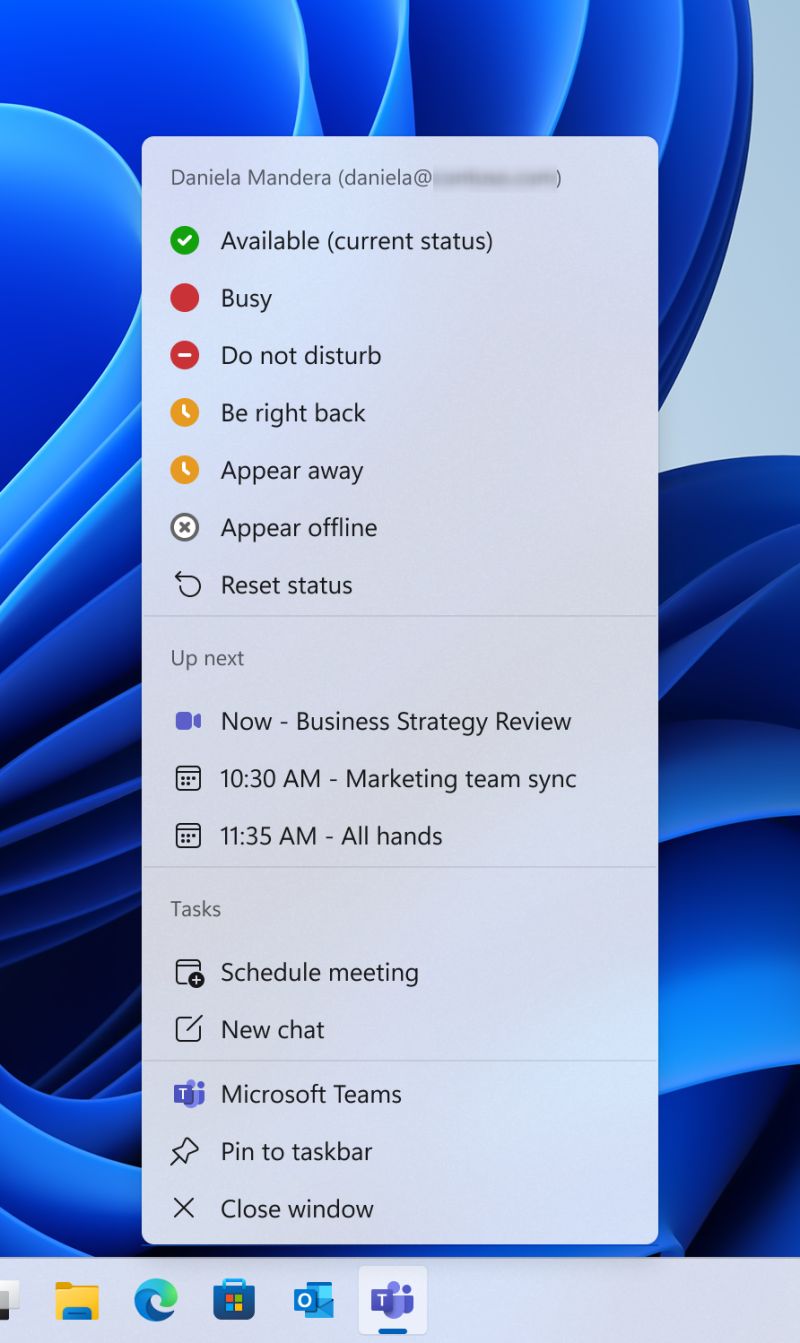
Short answer: The Microsoft Teams jump list, the menu you get by right-clicking the taskbar icon, now shows your current and upcoming meetings with a Join button, plus shortcuts to schedule a meeting and start a chat; Quit has moved to the system tray. Rollout ran from mid-November 2025 to mid-February 2026. Brief your help desk and update internal guides.
It sounds like a small thing. A right-click menu gets new items. But the Teams jump list change is actually a good window into how Microsoft is thinking about productivity, and it raises some worthwhile questions about how your organisation manages Teams adoption and training for this kind of incremental update.
This post covers what changed in the jump list, what it means for day-to-day Teams users, how to handle the rollout across your organisation, and why Teams user adoption in general deserves more attention than most DACH businesses give it.
What changed in the jump list
The Teams jump list is the context menu that appears when you right-click the Teams icon in the Windows taskbar. Previously it was minimal, an option to quit and little else. The updated version brings the jump list in line with the experience Microsoft has been building across other M365 apps.
New jump list items
-
NEW
Current and upcoming meetings. Your next scheduled meeting appears directly in the jump list, with a Join button. No need to open Teams, find the calendar, locate the meeting. One right-click from the taskbar.
-
NEW
Schedule a meeting shortcut. Opens the new meeting form directly without navigating through the Teams interface.
-
NEW
Start a new chat shortcut. Launch the new chat compose window from the taskbar.
-
MOVED
Quit option relocated. The "Quit" option has been moved from the jump list to the system tray icon exclusively. This prevents accidental closure when users are looking for other options.
The rollout started for commercial tenants in mid-November 2025 and completed worldwide by mid-February 2026. It is delivered through the standard Teams auto-update mechanism, no admin configuration required and no way to prevent individual users from receiving it.
Why this matters more than it looks
One meeting join click saved per day per employee is not going to transform your business. But the jump list change is part of a broader pattern worth understanding: Microsoft is continuously moving Teams toward being a persistent ambient tool rather than an application you switch to and from.
The jump list gives Teams presence in the Windows taskbar without requiring the main window to be in focus. Combined with the notification toasts, the system tray presence indicator, and the upcoming meeting reminder overlays, Teams is designed to be visible without being intrusive. The goal is that users never miss a meeting join window or an urgent message because they are working in another application.
For organisations that have struggled with Teams adoption, where staff still prefer to phone someone rather than use Teams calls, or where meetings are frequently joined late: this kind of ambient presence reduces friction at the margin. It will not replace a proper adoption programme, but it removes one small obstacle.
The broader Teams adoption challenge in DACH
German-speaking markets have specific adoption challenges that differ from the UK or US experience. Several factors are worth acknowledging honestly:
Works council (Betriebsrat) and data privacy
In Germany and Austria, implementing productivity monitoring features in Teams, including the Productivity Score and the detailed usage analytics that Microsoft provides, requires consultation with the Betriebsrat under the Betriebsverfassungsgesetz (BetrVG). Many organisations have blocked or limited these features pending agreement, which affects how IT teams can measure Teams adoption and where users are struggling.
The jump list update itself does not involve any monitoring or tracking. But if you are planning a broader Teams rollout or adoption push, the Betriebsrat consultation needs to happen before you deploy reporting dashboards, not after.
Phone system migration
Many DACH businesses still operate a traditional telephony system: a DECT phone on every desk, a DECT handset pool for warehouse staff, a physical PBX. The economics of moving to Teams Phone have improved significantly, but the habit change is substantial. Staff who have used the same phone system for a decade will not naturally gravitate toward Teams calls without training and the removal of the alternative.
If you are planning a Teams Phone migration, our managed Microsoft 365 service includes Teams Phone deployment and adoption support. The part of that migration nobody budgets for is the number inventory: which range belongs to which office, which numbers are free, and who holds each one. Our Teams Phone Configurator keeps that inventory live and does the assignment in one screen instead of a site-specific PowerShell runbook. The jump list's "Start a new chat" shortcut reduces one step in initiating a Teams conversation. Small friction reductions like this, repeated across an organisation, do move adoption metrics over time.
Training documentation that stays current
The "Quit" button moving from the jump list to the system tray will generate help desk tickets. It always does when something that was muscle memory changes location. The rollout finished in February 2026, so the right response is to update your internal Teams quick-reference card and send a brief notice to staff now, not after the calls start coming in.
More broadly, this is a good prompt to review whether your Teams training materials are current. Microsoft updates Teams frequently, and documentation that was accurate 18 months ago may show screenshots and workflows that no longer match what users see.
What IT admins should do now
- Brief your help desk about the Quit button relocation before it starts generating tickets. A one-paragraph internal update is sufficient.
- Update any internal Teams guides that mention the jump list or the Quit option. Search your SharePoint and Teams wiki for "Teams quit" or screenshots showing the old taskbar menu.
- Consider proactive communication to frequent Teams users, particularly those who manage back-to-back meetings and rely on the taskbar for quick access. The jump list meeting cards are a genuine time-saver once people know about them.
- Check your Teams update channel settings in the Teams Admin Center. Most organisations should be on the standard update ring. If you are on a preview channel, this change arrived earlier. If you have deferred updates for a user group, they will receive it later.
Managed Microsoft 365 & Teams support
We support Teams deployments and adoption for businesses across Germany, Austria, and Switzerland. That includes Betriebsrat consultation support, Teams Phone migrations, training material development, and ongoing change management as Microsoft releases updates.
For organisations that have deployed Teams but struggle with actual usage, where staff still use email for everything and meetings are a mix of Teams and physical rooms: we run adoption assessments that identify the specific friction points and address them practically.
This article was drafted with AI assistance and reviewed, edited and approved by IDE Solutions before publication. More in our Impressum.